One prompt
becomes a factory.
Describe your line in plain language. Thirty minutes later you have a first draft of the whole factory — layout, line balance, shift schedule, work instructions, robot programs — proven against physics before your floor ever sees it.
What changes for your operation
Faster plans, fewer expensive surprises, and less waiting on specialists. The sections below show how each one is proven.
Plans in hours instead of weeks
A layout study usually takes weeks of specialist time. The Factory Agent produces a first draft of the whole line in about 30 minutes: layout, line balance, shift schedule and robot programs. Your team spends its time deciding instead of drawing.
Mistakes found before you spend
Every layout is checked for clearances and safety zones, every schedule is simulated, and every robot program is verified before anything is ordered or installed. Problems show up on screen, where fixing them is cheap.
Less dependence on scarce specialists
Your engineers describe what they need in plain language and review the result. The agent does the layout, balancing, scheduling and robot programming that would otherwise wait for an expert's calendar.
Ready when demand changes
A new order, a lost shift, a new product variant: re-plan by asking, and get an updated balance and schedule the same day instead of starting a new study.
Works with what you run today
It sits alongside your ERP and MES and hands back standard files: STEP, DXF, Excel and vendor-native robot code. You can start with one line and the data you already have.
Spec to factory in one closed loop
Most of what hardware costs isn't physics — it's coordination. The Factory Agent closes the loop that humans currently glue together.
See it working
A robot cell programmed, simulated, and verified by the Factory Agent — real product, not a mockup.
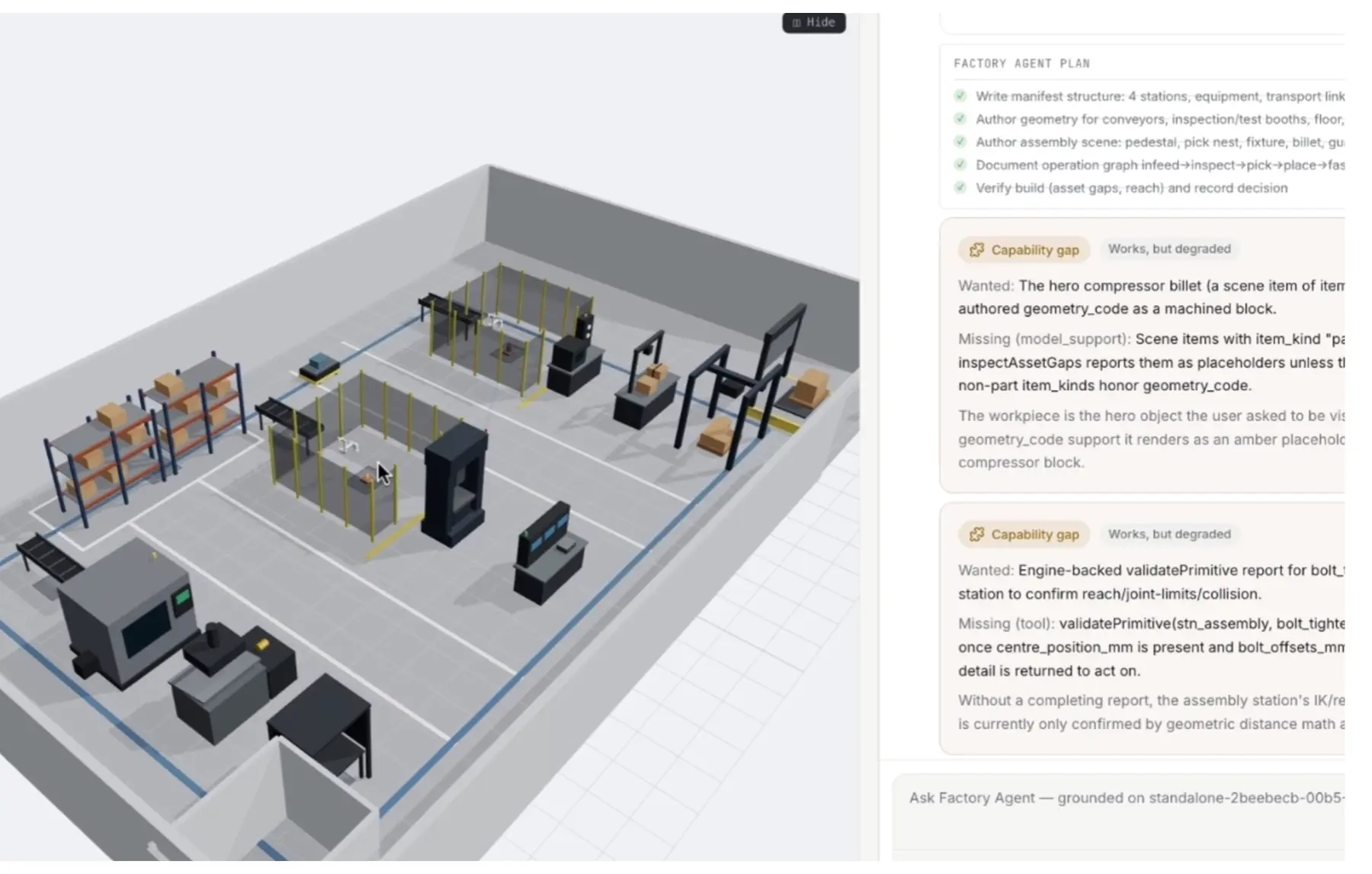
Factory layout & floor planning
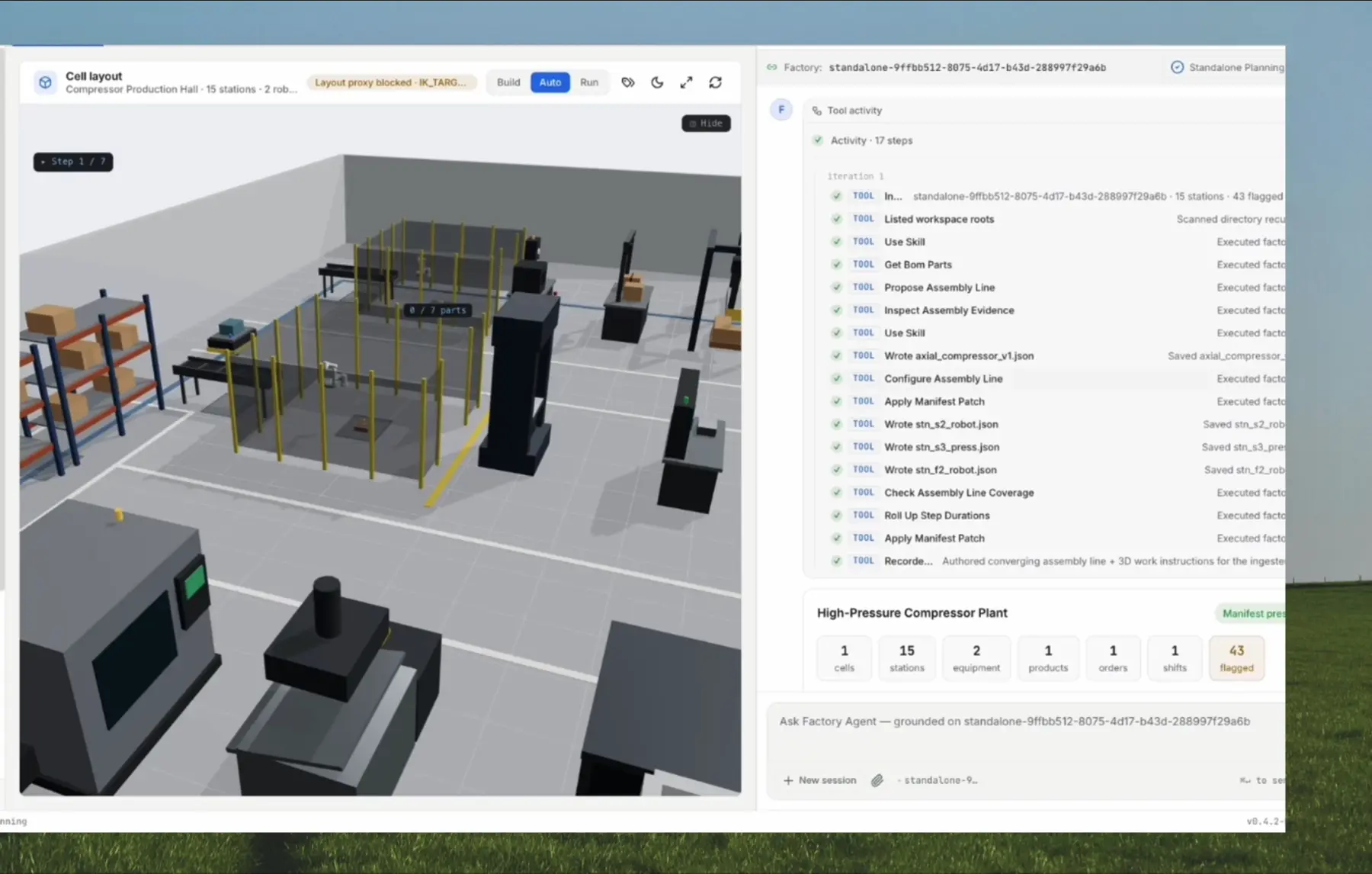
Describe it in plain language — Emboscale generates the factory layout as a dimensioned 3D twin.
- Stations, machines, conveyors, walls, fencing, safety zones — dimensioned, not decorative
- CAD ingest: upload STEP assemblies, auto-extract the BOM, place real part meshes into station scenes
- Layout feasibility & safety audits catch overlapping equipment, unfenced robots, blocked clearances
- DXF floor-plan export, Excel import, full manifest editing via chat
Planning, scheduling & simulation
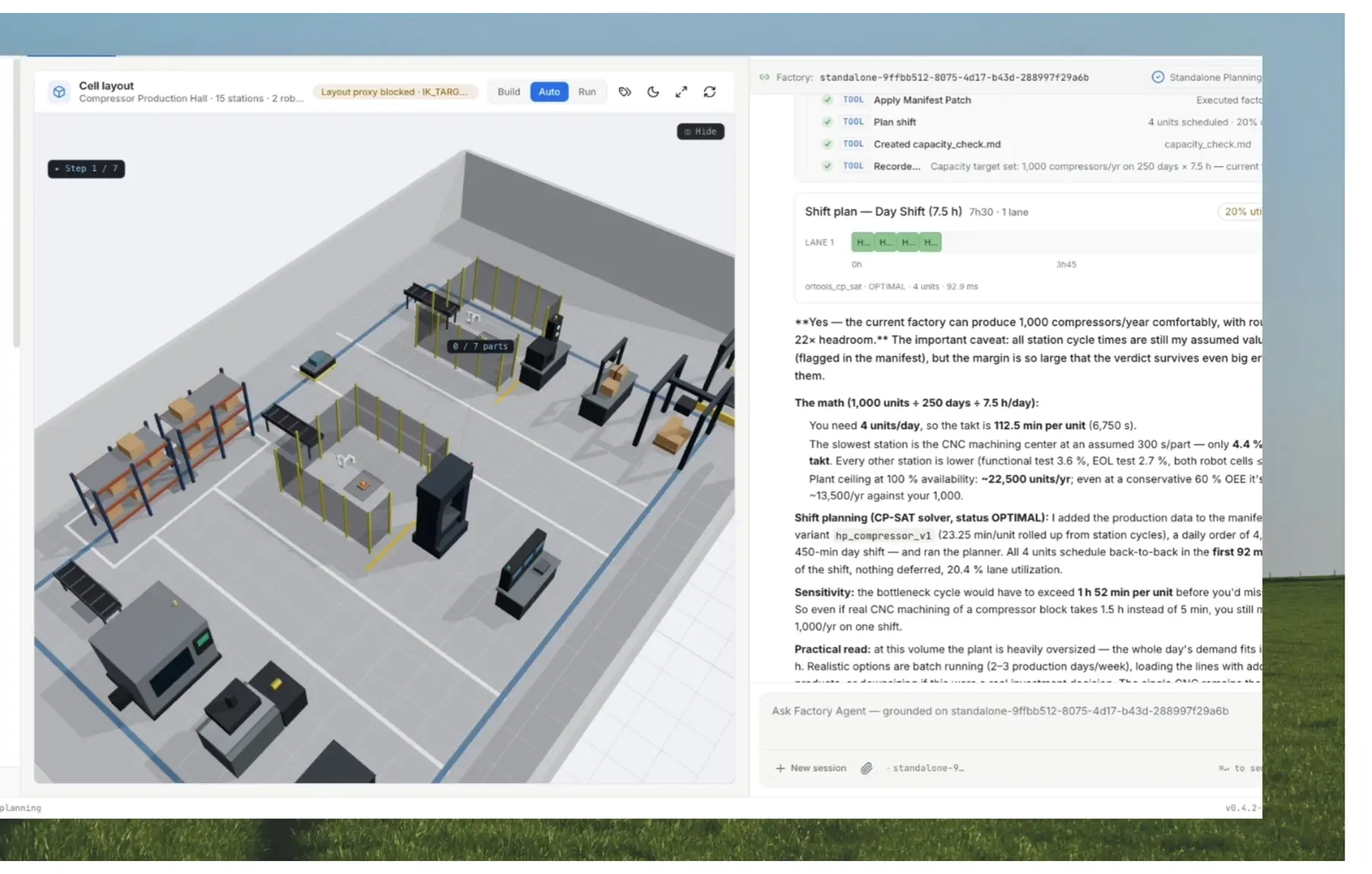
Deterministic math, not LLM guesses.
- Shift schedules from a CP-SAT solver — a Gantt with due-date-risk flagging
- Line balancing across stations with cycle-time rollups
- Discrete-event throughput simulation: takt, utilization, bottlenecks per station
- A readiness gate that says exactly what blocks production, and why
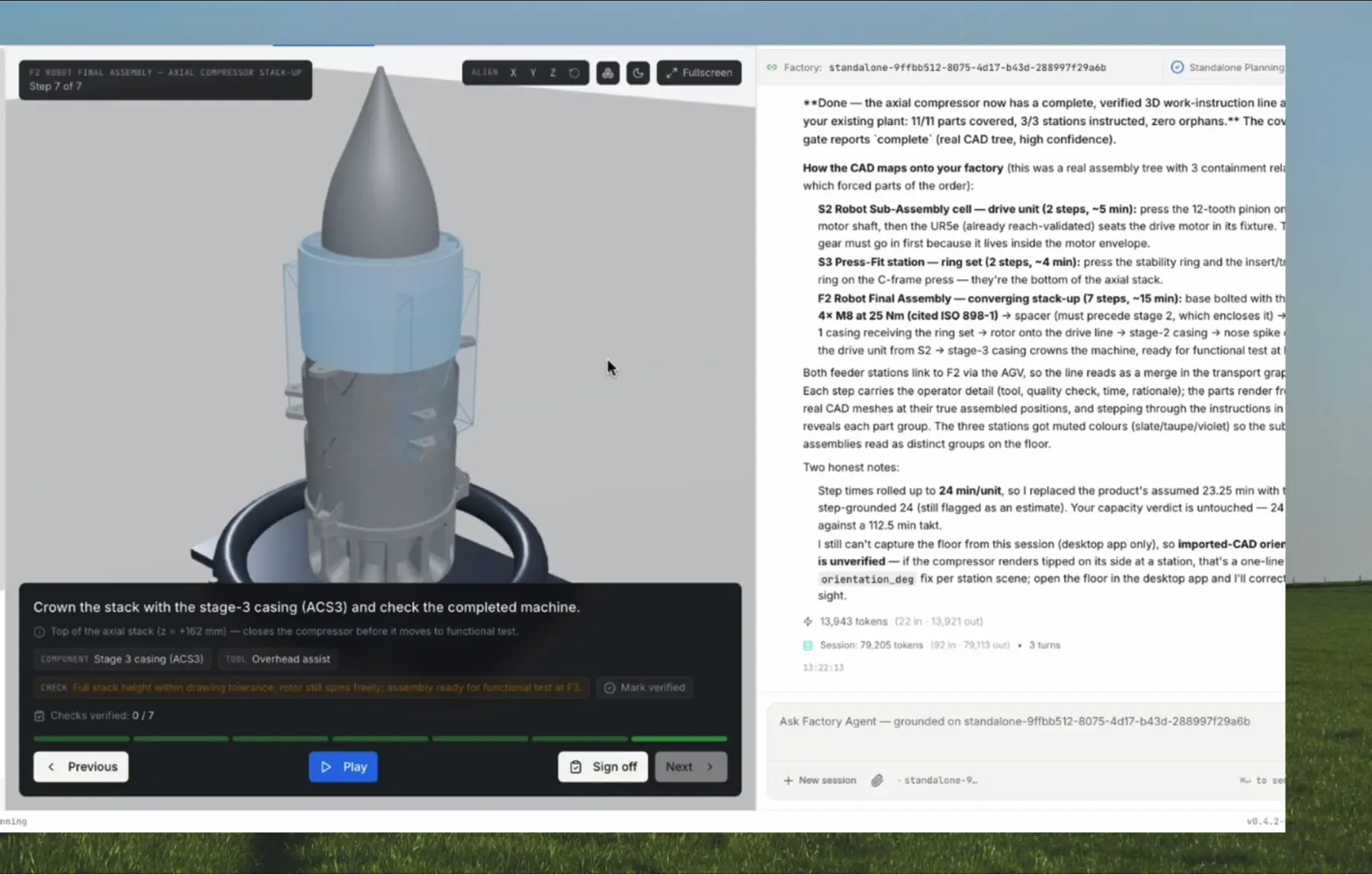
3D work instructions
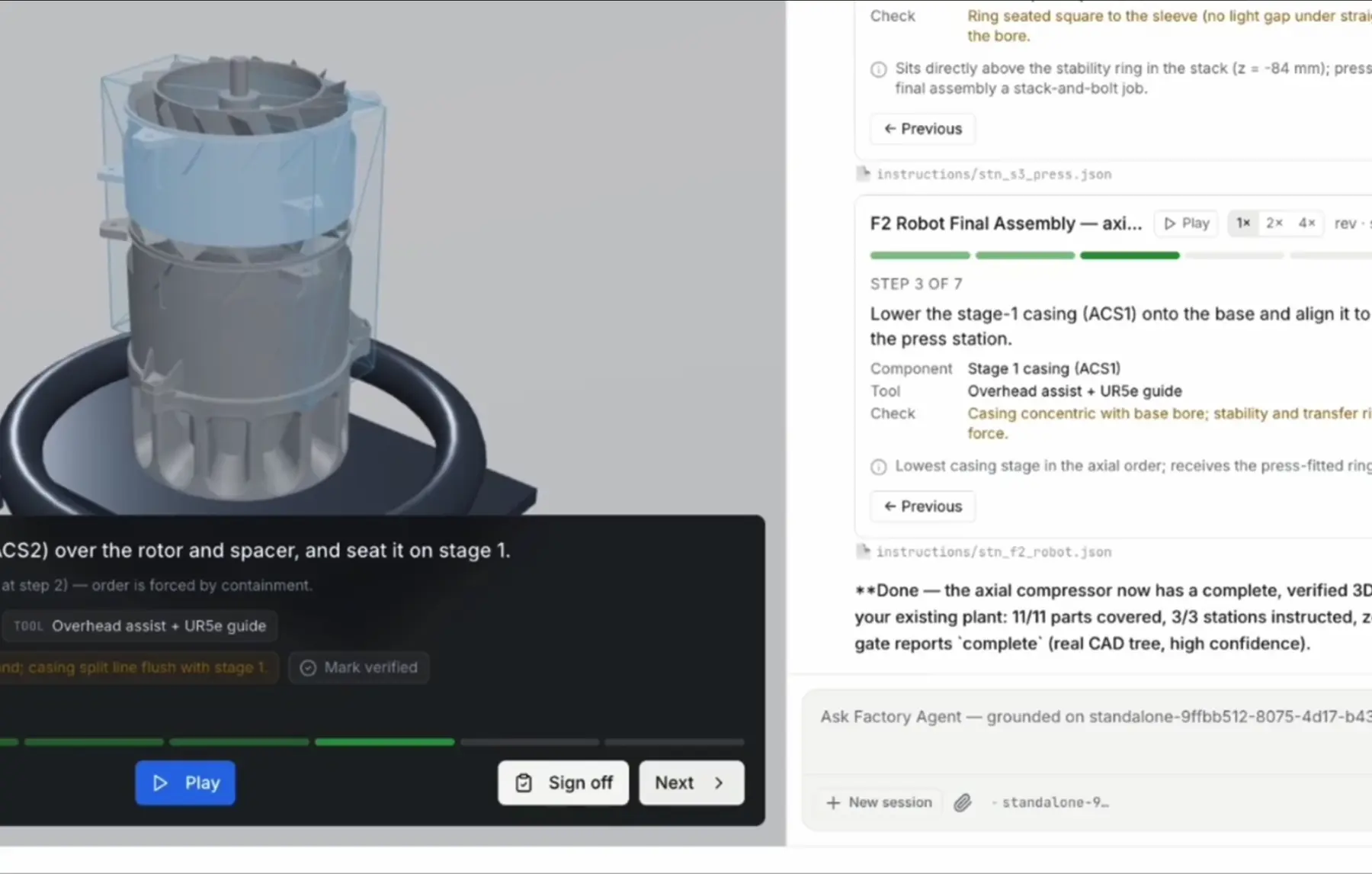
From a STEP file to instructions your operators can follow.
- Assembly sequence proposed, confirmed, and turned into step-by-step digital work instructions in 3D
- Every fastening step cites real torque specs, part by part
- Full-line playback: parallel stations, converging sub-assemblies, per-station counters
- Human sign-off built into every step
Agentic robot programming
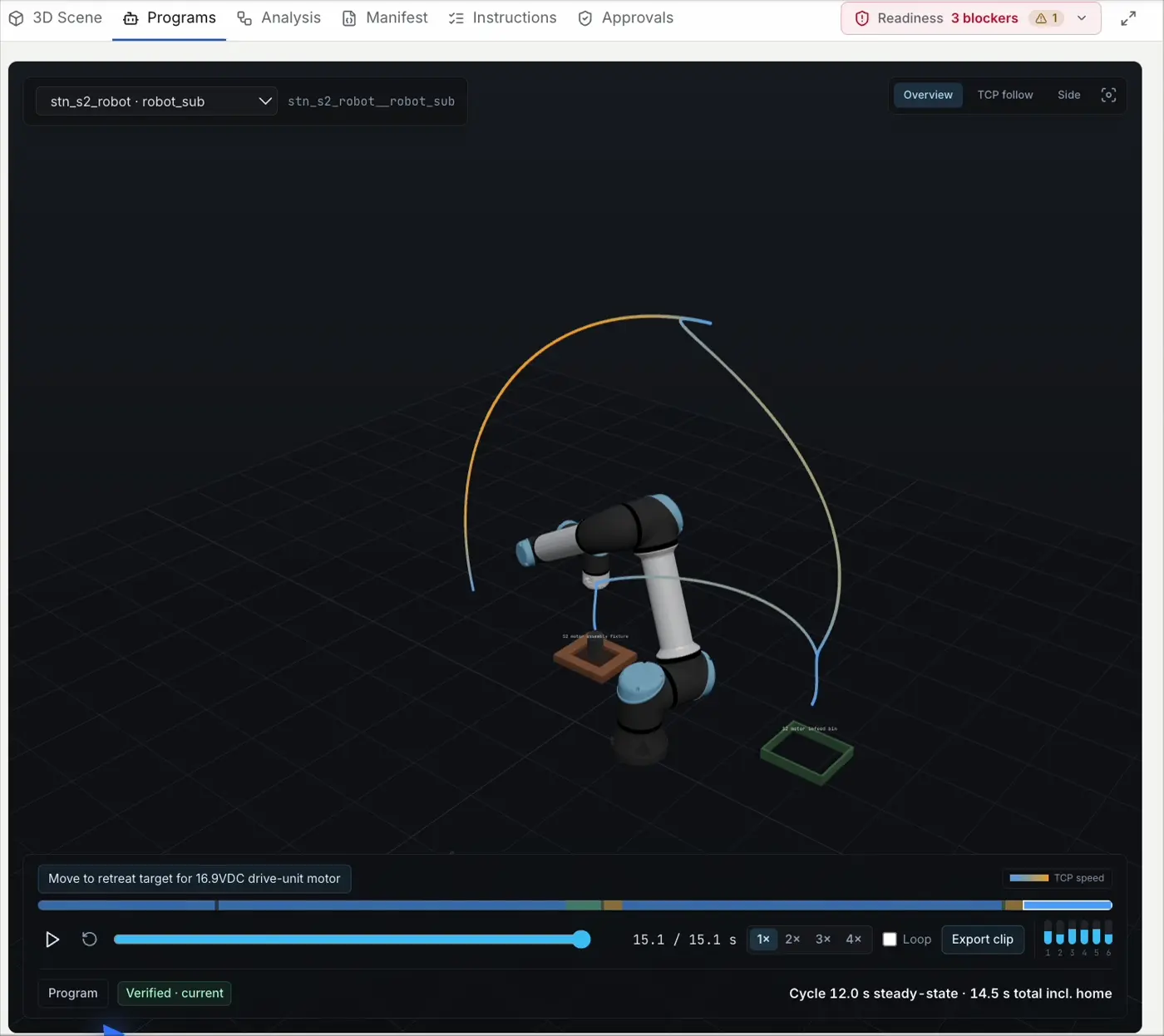
Offline robot programming, without the programming.
- Pick-and-place, palletizing patterns, multi-point screwdriving, welding
- Industry-standard 6-axis robot models with datasheet kinematics and real tool offsets
- Tool selection per part by width, mass, and payload; obstacle-aware transfer routing
- Multi-strategy authoring — 3 candidates compared, 27% faster after optimization, every variant re-verified
One agent, your rules
Your process knowledge compounds instead of evaporating.
- One conversation drives the 3D canvas; every number quoted is the verified number, verbatim
- Correct the agent once and it persists as a learned skill applied to every future plan
- Upload your standards; the agent elicits what’s missing and cites them in outputs
- Approvals gate consequential changes; every edit carries actor attribution
What you watch is the program
Every program runs an 8-check kinematic oracle — 600+ collision samples per program, gripper body and part-in-fingers included. Out-of-reach, over-payload, or blocked-transit gets a structured refusal with the number. Never a hallucinated success.
The agent can get it wrong — that is exactly why every program must pass all 8 checks before it is marked verified. What passes runs unmodified on the real robot controller software, and every run is timed, so cycle-time predictions keep getting more accurate.
The 3D playback is driven by the same physics the checks ran against — and your engineers still review and approve every program. Verification means mistakes get caught before they reach your floor, not that mistakes never happen.
Files your floor already recognizes
The formats your integrator, PLC engineer, and ops lead already use — with full provenance: what was verified, at what tier, against what. Your PLC and safety engineer stay in charge.
Fair questions
What does Emboscale actually do?+
You describe a production line in plain language. The Factory Agent plans the factory floor — a dimensioned 3D layout — balances the line, builds shift schedules, simulates throughput, writes digital work instructions, and programs the robot cells. Every program passes an 8-check kinematic verification before you see it marked verified.
Can AI really write robot programs?+
Yes — with a catch that matters. The agent authors pick-and-place, palletizing, screwdriving, and welding programs on industry-standard 6-axis robot models with datasheet kinematics. But AI can get it wrong, which is why every program must pass joint-limit, continuity, timing, and collision checks (600+ samples per program) before it counts. Anything out of reach or over payload gets refused with the number.
Can Emboscale generate a factory layout from a description?+
Yes — that is the starting point. Describe the line in chat and the factory layout comes back dimensioned: stations, machines, conveyors, walls, safety zones, as a full 3D digital twin. If you have CAD, upload STEP assemblies and the agent extracts the BOM and places real part meshes into the station scenes. DXF floor plans and Excel data work too.
Is this a simulation tool or a planning tool?+
Both, in one loop. Shift schedules come from a deterministic CP-SAT solver — a real Gantt with due-date-risk flagging, not LLM guesses. Line balancing rolls cycle times up across stations, and throughput runs through discrete-event simulation: takt, utilization, and bottlenecks per station. A readiness gate tells you exactly what still blocks production, and why.
Is AI-generated robot code safe to run on my line?+
The code runs unmodified on the real robot controller software, and verification catches mistakes before they reach you — but your engineers stay in charge. An approvals workflow gates consequential changes, every edit records who made it (agent or human), and your PLC and safety engineers keep the final word.
How is this different from traditional offline robot programming (OLP)?+
Traditional OLP tools make you do the programming in a different interface. Here you prompt the task, the agent writes and verifies the program, compares multiple strategies, and optimizes cycle time — 27% faster on our benchmark cell. Planning, simulation, instructions, and robot programming share one context instead of living in separate tools.
How long does it take to get a factory plan?+
About 30 minutes from prompt to first draft: layout, line balance, shift schedule, work instructions, and robot programs, with verification already run. From there you iterate by prompting — change the takt, swap a station, add a shift — instead of restarting a weeks-long planning cycle.
Do we have to replace our ERP or MES?+
No. Emboscale layers on top of what you run today. It takes what you already have — DXF floor plans, STEP assemblies, Excel data — and hands back files your existing systems recognize: vendor-native robot code, STEP, DXF, XLSX, and AutomationML. Nothing gets ripped out.
What do I get out at the end?+
Files your floor already recognizes: vendor-native robot code, deploy packs with safety-zone proposals and full verification provenance, STEP bundles, DXF plans, XLSX factory docs, and AutomationML.
Put the Factory Agent on your line
Bring a line you're planning — we'll build the twin, simulate it, and program a cell in front of you.
Book a demo
Tell us about your line and we'll get back to you within a day to set up a live session.